
Build A Car Empire HUD and Controls
Where the keep-or-sell board, crate shop, and Codes window actually sit on the lot.
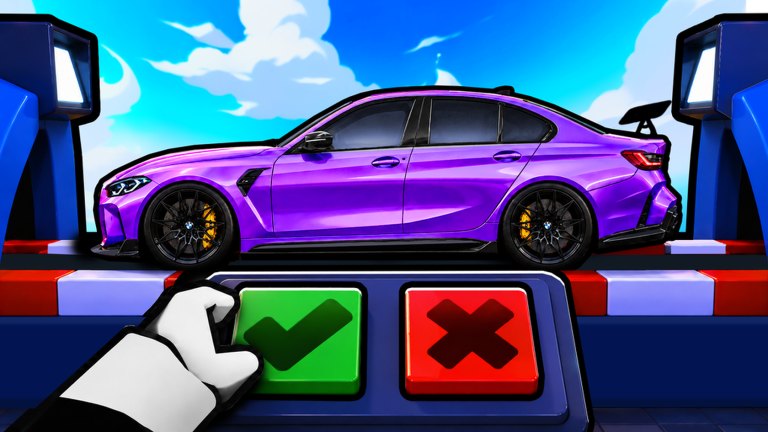
Build A Car Empire is not a racing sim. You are not hunting shift-lock, nitro binds, or a driving HUD. You are managing a Roblox crate lot: buy a crate, watch a car land on a lift, tap keep or sell, then park keepers so they print cash. This page maps the controls that matter. Read it once, then go back to how to play. If a button is missing from your session, finish the first crate prompt before you assume the game is broken.
The only board that is skill
The keep-or-sell prompt is the ceiling. Official media shows a white glove over a green check (keep) and a red X (sell), with the rolled car on a lift. On PC, click one square. On mobile, the same two squares are large on purpose. Do not mash both. A double tap can confirm a sell you did not want, and there is no documented undo.
Treat the board as a modal. While it is open:
- Do not open the shop.
- Do not open Codes.
- Do not toggle Auto Roll or Auto Sell.
- Do not leave the server.
If Auto Sell is on, confirm the filter cannot eat Epic Aventa or Exotic Concept Ghini before you look away. That pass costs 39 Robux. It is cheap because it is dangerous. Full buy order lives on gamepasses and the pass priority sheet.
Cash, shop, and crates
Cash sits in the HUD so you can see whether the next crate is affordable. The shop or crate button is how you spend that cash. Buy the cheapest crate you can actually finish. The official rarity art is the warning: Common is 1 in 2, Exotic is 1 in 920,584,217. A shop that looks empty after a silent save is a reason to reread how to get money, not a reason to paste a script.
The experience description also says you discover cards and collect cars. There is no public card index as of 12 September 2026. If a card tray appears in your HUD, screenshot the names and treat new cards like new banners: they do not go on the car tier list until you can see the chip. Do not invent a tarot-style deck because another tycoon uses cards.
Codes window
Codes is a separate control from the lift. Open it after the board is clear. There is still no public verified code as of the 12 Sep 2026 recrawl. That does not make the window useless. Compensation strings sometimes appear after a universe save without a group shout. Type once, submit once, stop if it fails. Full steps: how to redeem. Channels that might someday be real: where to find codes.
Pass toggles
When you own a pass, expect a toggle, not a new mini-game.
- Auto Sell (39 Robux) — sells without the red X. Configure it, then watch one crate.
- Auto Roll [OP] (99 Robux) — repeats crates. Pair with printers and a safe Auto Sell. Never as your first purchase.
- 2x Cash (229 Robux) — live multiplier while you sit.
- 2x Offline Earnings! (329 Robux) — AFK multiplier after a clean logout. Dedicated notes: offline earnings.
- VIP (129 Robux) — store description is empty. Believe an in-game tooltip, not a rumor.
- 5X LUCK! (679 Robux) — last. Luck does not print cash. See crates and luck.
Prices come from the official game-pass API on 12 Sep 2026. If a number in your shop differs, trust the shop.
Camera, movement, and what you can ignore
Movement is standard Roblox. Camera pan is enough to see the lift and the parked row. You do not need shift-lock. You do not need a racing wheel bind. This is not Driving Empire and it is not a kart track. If a clip you opened has nitro, cops, or a highway, you opened the wrong game.
Servers hold 8 players. Neighbor lots can distract you; they cannot drive your crate. VIP servers are not enabled on the universe (createVipServersAllowed is false), so VIP is not a private-instance product. Play on a public 8-player server. If the lot stutters, hop once from the Roblox page, then continue the getting started loop.
Mobile versus PC
Mobile uses the same two keep-or-sell squares. Fat-finger risk is the whole mobile skill gap. Rest your thumb off the red X until you have read the rarity chip. PC players have the opposite problem: clicking through animations. Wait for the car to finish landing. The keep-or-sell sheet is the checklist to keep next to the board.
Group, favorite, and the Roblox overlay
The Roblox menu (Esc on PC, the system overlay on mobile) is how you leave, mute, or report. It is not how you redeem codes. Join Trifall Studios from the group page or the in-experience prompt if one appears. The group is free, public, and had about 162,693 members at the 12 Sep recrawl. The shout was empty. Favorite the experience so the next thumbnail change shows up in Continue.
A one-minute control drill
- Load in. Let the lot finish streaming.
- Confirm cash is visible and the crate button works.
- Open one cheap crate.
- Read the chip. Keep or sell on purpose.
- Open Codes once, close it, and go back to the lift.
If that drill works, you already have the HUD. Everything else on this wiki — tier list, updates, scripts — is a multiplier on those five taps.
Frequently Asked Questions
Quick answers for crate rolls, cash, and collection questions.
Where is the Codes button?
It is a HUD control separate from the lift. Open it only after keep-or-sell is closed. Steps: how to redeem.
Do I need shift-lock or racing binds?
No. This is a crate lot, not a racer. Camera pan and the green check / red X are the real controls.
Can I buy a VIP server?
The universe does not allow VIP servers. VIP is a 129 Robux gamepass with an empty store description. See gamepasses.
What are the card controls?
The official description mentions discovering cards, but no public card list or dedicated tray docs exist yet. Screenshot any tray you see and keep playing the lift.